TXTWRK


PERSONAL
LinkingLinking
FollowingFollowing
ConnectionsConnections
MessagesMessages
NotificationsNotifications
Work
PostingPost
NotesNotes
NeedsNeeds
ContributionsContributions
TimetableTimetable
IntelIntel
To DosTo Dos
ChecklistsChecklists
SavesSaves
ScrapboardScrapboard
LinksLinks
DISCOVER
SearchSearch
ReelsReels
All ActivityAll Activity
CalendarCalendar
MapMaps
Getting StartedLaunch
HappeningHappening
Local PulseLocal Pulse
Products NearbyNearby
Trending TopicsTrending
TXTWRK PremiumPremium
Monetisation
CoinsCoins
AdvertisingAdvertising
SubscriptionSubscription
DonationDonation
Log BookLog Book
Organisation
BusinessBusiness
AddressesAddresses
InvestorInvestor
FinancialsFinancials
Quarterly'sQuarterly's
SharesShares
Server
ServerServer
WorkspaceWorkspace
Code PlaygroundPlayground
Learn More
AboutAbout
AIDAID
DataData
DevDev
Web ImpressionsImpressions
ToolsTools
EducationEducation
SafetySafety
ReaderReader
My Content
Login
Profile Image
Post submitted
Favorited by... X
Link Clicks X
All comments... X
More | 1/34

TXTWRK Verified Website

@TXTWRK

City of Derby, Derby, Derbyshire, East Midlands, England, United Kingdom, Europe

Our mission is to help people make text work in daily life. Get investment, volunteers, donations & more publicly…

Join the journey & make a profile to remember... Discover our investment opportunities via our card: @TXTWRK

We developed & support the @UnitedKingdom movement through #UnitedKingdom


Brand
12/01/2024
Learn more about me 𓇻
Donations: £2.50
▦ Photos
▦ Videos
▦ Covers
Applications
Questionnaires
Active: 27 minutes ago
Safety


OPENING TIMES
Show Images
Select a Store Location...
▼

Initializing schedule...

LOCAL PULSE

Profile Signals

Loading…
Loading profile signal…

Loading latest public Local Pulse signal…

Financials Financials
Quarterlys Quarterlys
Shares Shares
Notes Notes
Needs Needs
Contributions Contributions
Timetable Timetable
Intel Intel
To Dos To Dos
Notes Reel


Happening & Service
Happening Now and service updates connected to this profile


Happening in Offers
Offers available from this profile
Loading offers…


Connections
These are pages I added


Intel Pinned

Transparency of Operations
To make things even clearer, we are going to be updating our business registration in the coming days to 'TXTWRK Limited' in the UK & currently operate online in our startup phase, with workshops in educational institutions & community settings. We operate via the following domains: We monitise via the following sites: We operate the following social media: We operate the email addresses:
•Team@TXTWRK.com
•Support@TXTWRK.com
•Business@TXTWRK.com
•CommunityLibrary@TXTWRK.com
•Sponsors@TXTWRK.com
•Volunteer@TXTWRK.com
•Work@TXTWRK.com
•Writers@TXTRK.com
We operate the following TXTWRK pages: We operate the phone numbers: •447984582170 •0800 line coming soon We operate the following addresses:
•Currently in the process of setting up our office
•PO BOX coming soon & we focus on written communications
More intel:
•Need to request a removal from our Community Library, then simply email CommunityLibrary@TXTWRK.com
•Looking for account control, refer to ⚙ Settings/Linking to update your details or view https://txtwrk.com/account to understand your data or delete account
•We will never ask for your password or sensitive information and you should follow forms such as https://txtwrk.com/reset if you need to regain access to your account.
•We operate PayPal via our websites & also on TXTWRK
We keep this information up to date and concurrently here at TXTWRK via our intel reels - Last updated: 13/04/2026 00:16
Pinned Intel · 2026-04-12 23:14:46


Loading media...
1S HOLD OPEN
+AI
+Analysis
•TXTWRK
+Assets
+Media
•Logos
+Standards
•Font
+Audio
•From Our Community
+Podcasts
+AI
•Insider Preview
+Language
•S1 E1 Psychology Research by @ImSunnyClaire
+Challenges
•Web Development
+Checklists
+Dev
•Business
•Server
•Web
•For Community
+Community Mentions
•Recognised as Stories
+Datasets
+Measurements
•Daily Common
+Documentation
•3D, AR & VR
+AI
•Checklists with AI
•Future Capabilities
•Insights
•Make Artistic Web Impressions
+Models
•Apple Intelligence
•Bing Copilot
•ChatGPT
•Claude
•IBM WatsonX
•Perchance
•Qwen
•TXTWRK AID
•Teaching
+Accessibility
•Feature Displayer
+Account Management
•Switch Accounts
•All Activity
+Assets
•Feedback
•Learn how to use assets
+Posting
•Set Projection
+Business
•Opportunities
+Checklists
•All Activity
•Applying
•Checklists Command Input 1.0
•Create
•Create Checklist with AI
•Directory API
•Engage
•Public Working
•Replicate
+Templates
•Starter Set
•Connect
+Data
•Account
•Cross Network Data API
•Directory
•Donations
+Feedback
•Streets
•TXTWRK Pulse
+Feeds
•Just For You
•Following
+Games
•Quiz
•Happening
+History
•In 1000 years
+Investors
+Crowdfunding
•Kickstarter
+Funding Rounds
•Funding Round 1
•Funding Round 2
•Funding Round 3
+Summary of Funding Rounds
•3 Core Funding Rounds
•Tools
+Labels
•Introduction
+Live
•Audio Rooms
+Location
•Addresses
+Management
•Future Proof
+Media
•3D Elements
•Record Audio
+Web Impressions
•Stickers
•Themes & Slideshows
•Messaging
•Monitisation
•Notifications
+Posting
•Prize Draws
•Transparency
+Progress
•Friday Weekly Updates
•In 1000 years
•TXTWRK Team
•Questions
•Reels
•Registration
+Safeguarding
•Covers of Education
•Logical Filters
•Our Safety Tools
•Search
+Selling
•Log Book & Types
+Server
•Connect to TXTWRK
•TXTWRK Servers
•Workspace
•Set Projection
+Shortcuts
•Posts
•Story Mode
+The Framework
•Language
•Tools
•Trending Topics
+Events
+April
•Easter
+December
•Christmas
•Hanukah
+March
•Eid Mubarak
•Seasons
+TXTWRK
•Annual
+Films
+From TXTWRK to Film
•Our Trail To Work
+Person of Interest X 2025
•Preview
+The Super 10
•Preview
+Learn How To
•Social Media
+Our Feedback
+Companies
+Alphabet Inc
•YouTube
•Facebook
+Partners
+AI
•Microsoft
+Educational
•Derby College
+People
+Digital
•Steve Jobs
+Role Models
•Questions
+Shop
+Digital
•NFT The Platinum Collection
+Subscriptions
+From TXTWRK
•Monthly Tiers
+United Kingdom
+Guidance
•Startups
+Podcasts
•S1 E1 The Start
+Work
+Startup
•Kids
+World
•Pledges
•Politics


@TXTWRK


Topic: Guides
⛶
Technology
Neutral
TXTWRK: The Complete Platform Guide


Communities, Knowledge, Work, Business and Connected Infrastructure


The Friday Update — 23 October 2026

Nearly three years of development. A 1,000-year vision. One connected platform.

Welcome to TXTWRK


TXTWRK is being developed as a connected environment for people, communities, organisations, businesses and projects.

It combines social communication with practical tools for organising information, working together, developing ideas, managing resources and connecting existing websites.

The platform is built around a simple belief:

A digital community should be able to do more than communicate. It should be able to build, organise, collaborate and preserve the value of its work.

TXTWRK brings together several major areas:

1. Personal profiles, identity and social connections.
2. Posts, discussions, topics and community activity.
3. Checklists and collaborative workspaces.
4. Connected Servers and file infrastructure.
5. Direct and group messaging.
6. Business and organisational participation.
7. Products, purchases, investments and subscriptions.
8. Events, calendars, locations and education.
9. Community resources, directories and libraries.
10. APIs, integration tools and developer infrastructure.
11. Notifications, reporting, moderation and safety.
12. Long-term knowledge and community development.

These areas are supported by the platform's expanding /system/core/ architecture.

This guide introduces what users can explore, explains the principal workflows and highlights the latest development work.

---

PART ONE — GETTING STARTED


1. Create your TXTWRK identity


Your account is the starting point for participation.

TXTWRK supports personal profiles, usernames, profile images, account information and connections between members.

How to begin


1. Visit https://txtwrk.com.
2. Register or sign in.
3. Open your profile.
4. Review your account information and profile presentation.
5. Explore the available profile, connection and participation controls.
6. Begin discovering people, topics and communities.

The platform includes functionality for profile editing, following, account connections, user information, profile media and additional profile-related settings.

Why it matters: A profile gives contributions an identifiable place within the wider TXTWRK community.

2. Discover the platform


TXTWRK contains search and discovery functionality for posts, users and topics.

You can use discovery to find conversations, people and subjects relevant to your interests.

The platform also includes location-based data structures and tools that can help organise information geographically.

Getting started: Search for a subject you care about, explore the relevant content and follow the people or discussions you want to revisit.

3. Build your network


TXTWRK includes following and connection functionality.

Members can develop relationships around shared interests, projects, business activities and community participation.

Connections are especially useful when a conversation develops into an ongoing collaboration.

---

PART TWO — COMMUNICATION AND COMMUNITY


4. Posts and discussions


Posts are one of TXTWRK's central ways of sharing information.

The platform includes systems for creating and retrieving post content, working with images and videos, following posts, managing topics and reporting content.

A post might introduce:
•An idea or proposal.
•A community announcement.
•A project update.
•A question or discussion.
•A business opportunity.
•A research subject.
•An event or activity.

How to participate


Find a post that interests you, read its context and use the available interaction controls to contribute.

Where supported, attach relevant media or link to related material.

Good practice: Keep the main subject clear so that later contributions remain understandable.

5. Topics and subject discovery


Topics help organise participation around subjects rather than leaving every discussion isolated.

TXTWRK includes topic-related functionality for posts, Checklist comments and replies, together with topic search and management components.

Topics are useful for connecting conversations about science, technology, business, education, local communities, culture and other fields.

They also support the platform's wider ambition to connect related knowledge across different types of content.

6. Replies and Threadlets


TXTWRK's discussion model can extend beyond a simple sequence of comments.

Within Checklists, replies can contain Threadlets: deeper conversational contributions connected to a particular reply.

This allows a discussion to develop in context.

For example:

Checklist item → Comment → Reply → Threadlet → Further Threadlet

Threadlets are useful when a reply generates its own detailed discussion.

Recent development work has strengthened direct linking, media handling and moderation of these conversations.

7. Direct and group messaging


TXTWRK includes messaging functionality for individual conversations and groups.

The source system contains components for direct chat, group creation, group membership, message reading, media uploads, audio storage and message management.

How communities can use messaging


Direct messages can support individual coordination.

Group conversations can help members organise around a shared project or purpose.

Messaging can complement public posts and Checklists when a smaller conversation is more appropriate.

The platform also includes Connected Server-related messaging settings and communication infrastructure.

8. Notifications and All Activity


Notifications help members identify relevant interactions and developments.

All Activity provides a broader way of recording and presenting actions associated with participation.

The platform includes notification retrieval, read status, notification preferences and activity-related APIs.

These systems help users follow developments without manually revisiting every conversation.

Recent moderation improvements also address the cleanup of activity and notification records when Checklist contributions are hidden or deleted.

---

PART THREE — CHECKLISTS AND COLLABORATIVE WORK


9. Understanding Checklists


Checklists are among TXTWRK's most substantial collaborative features.

They bring structured items together with discussion, participation, supporting files and ongoing activity.

A Checklist can support:
•A community project.
•A research initiative.
•A development plan.
•An organisation's work programme.
•An educational activity.
•A creative production.
•A long-running public-interest subject.

Unlike a conventional task list, the TXTWRK Checklist system connects the work itself with conversations and supporting resources.

10. Checklist items


Each Checklist can contain individual items representing areas of work or subjects requiring attention.

The system includes item editing, details, topics, relevance controls and associated discussions.

Practical workflow


1. Open a Checklist.
2. Select an item.
3. Read the item's details and associated contributions.
4. Add a comment or reply where permitted.
5. Follow subsequent discussion and updates.
6. Use linked resources where available.

The item becomes a central point for both the work and its history.

11. Checklist comments and replies


Checklist comments provide a way to contribute directly to an item.

Replies allow other participants to respond to a particular comment.

The platform also supports acknowledgements, pinned contributions, topic associations and reporting functionality.

This creates a more organised discussion model than a single undifferentiated comment feed.

12. Checklist participation and applications


TXTWRK includes functionality for Checklist applications, applicant responses, member management and applicant messaging.

This allows Checklist participation to involve more than simply reading public content.

Depending on the Checklist's configuration and permissions, people may apply to participate and gain access to relevant collaborative capabilities.

13. Checklist moderation


The platform includes moderation controls for Checklist comments, replies and Threadlets.

These include hiding, soft deletion, reporting and other administrative actions.

Recent improvements support:
•Preserving underlying contributions and relationships.
•Removing associated activity and notifications where appropriate.
•Moderating individual Threadlets.
•Moderating an entire descendant Threadlet branch.
•Keeping contributions above a moderated branch unaffected.

This approach helps communities maintain readable discussions while preserving important structural information.

14. Checklist templates and reuse


The source system includes Checklist templates, design controls, copying functionality and downloadable data components.

These can support repeatable work across similar projects.

For communities, reusable structures can reduce the effort involved in starting a new initiative.

---

PART FOUR — CONNECTED SERVERS AND FILES


15. Connect an existing website


TXTWRK's Connected Server system is intended to make existing infrastructure useful within the platform.

A community may already operate a website with files, folders and resources.

Instead of rebuilding everything from scratch, its owner can connect that Server to TXTWRK.

The platform includes Server registration, verification, ownership checks, settings and supporting APIs.

Typical setup


1. Open the Server management area.
2. Add the website or Server.
3. Complete the required verification process.
4. Configure its supported capabilities.
5. Review which files and folders may be made public.
6. Connect the Server to relevant TXTWRK functionality.

The exact deployment requirements depend on the connected Server's endpoint and configuration.

16. Public Files / Folders


Server owners can specify which paths should be publicly accessible through TXTWRK's supported directory integrations.

The latest update introduces three complementary settings:

Public folders — directories available for public browsing.

Public files — individual files available for public browsing.

Excluded files / folders — paths removed from public TXTWRK directory access, even when they fall inside a public folder.

For example:

Public folder: /

Excluded paths:
•/includes/
•/.env
•/private/
•/TXTWRK.php

This can make it easier to integrate an existing root-built website while excluding selected internal resources.

Security reminder: These exclusions control TXTWRK directory visibility. They do not block direct requests to the connected website. Sensitive resources must also be protected by the Server's own authentication and access controls.

17. Checklist File Explorer


The Checklist File Explorer connects a Checklist workspace with files on its associated Server.

The system distinguishes between the Server owner, authorised Checklist members and public visitors.

Depending on permissions, users may be able to browse directories and perform supported file operations.

The interface includes controls for navigating the Server root, returning to the Checklist root, opening a member directory, refreshing the listing and filtering visible entries.

Supported management components include creating folders and files, renaming, moving and deleting resources.

The directory system also contains reference-synchronisation functionality to help keep related references aligned after file operations.

18. Media and connected resources


TXTWRK includes support for images, video, audio and file attachments across different areas of the platform.

Connected media can link discussions with resources hosted on an associated Server.

Recent improvements have focused on media rendering and handling within Checklist conversations and Threadlets.

For community projects, this allows supporting resources to remain associated with the discussion that gives them meaning.

---

PART FIVE — BUSINESS, PRODUCTS AND INVESTMENT


19. Business profiles and participation


TXTWRK includes business-oriented profile and application components.

The platform source contains business registration, business profile, business intelligence and business application functionality.

These systems establish a foundation for businesses and organisations to participate alongside individuals and communities.

Potential uses include presenting organisational information, engaging with relevant topics and connecting opportunities to community discussion.

20. Products and purchases


TXTWRK contains a substantial product-related subsystem.

The source includes product retrieval, product APIs, purchase availability checks, purchase reservations and purchase recording.

It also contains a Product Logbook system with functionality relating to product details, claims, history, buying and resale.

This indicates an approach in which products can have associated records and activity rather than existing only as isolated listings.

The availability of individual purchasing features depends on the relevant product and account configuration.

21. Investments and funding


Investment-related functionality is another major part of TXTWRK's architecture.

The system includes components for:
•Retrieving investment information.
•Recording investments.
•Reserving and cancelling investment opportunities.
•Checking investment status.
•Investment approvals.
•Funding details.
•Investment-related APIs.

This creates a basis for connecting financial and developmental opportunities with the wider platform.

Users should review the specific terms and status of any opportunity before treating it as available or actionable.


@TXTWRK:Invest! represents a way to bring ideas and opportunities into the TXTWRK investment conversation.

The concept can be relevant across different topic types, including business, science, education, technology, culture, community infrastructure and research.

A useful contribution explains:
•What the opportunity is.
•Why it matters.
•Who could benefit.
•What resources or collaboration may be required.
•What long-term value it could create.

The tag is a call for attention and discussion, not an automatic funding decision.

23. Subscriptions and account tiers


TXTWRK includes account-tier, subscription and payment-related functionality.

The source contains subscription processing, subscription status, profile subscription records and account-tier management components.

These systems can support different types of access or commercial participation where enabled.

Users should consult the actual account interface for current terms, availability and pricing.

---

PART SIX — LOCATIONS, EVENTS AND EDUCATION


24. Locations and geographical context


TXTWRK contains an extensive location subsystem.

It includes location records, country-level information, location search and suggestions, geographic relationships, addresses and location-linked content.

This can help connect digital participation to real places.

For communities, geographical context is particularly useful when a project relates to a neighbourhood, region, country or physical venue.

25. Events and calendars


The platform includes event-related APIs, event retrieval, calendar data and calendar-management components.

Events can help communities connect ongoing discussion with activities occurring at particular times.

The broader data structure also supports event information organised by location and subject.

26. Education and learning


TXTWRK includes education-related components and learning-oriented calendar data.

These establish a foundation for connecting knowledge, events and community participation.

The long-term opportunity is to make learning part of ongoing community activity, rather than separating it entirely from practical projects and discussion.

---

PART SEVEN — COMMUNITY RESOURCES AND STRUCTURED INFORMATION


27. Directories and community libraries


The platform includes directory creation, file retrieval, directory management and community library components.

These provide infrastructure for organising and accessing resources.

A directory can help people find relevant information, while a library can provide a more enduring place for material connected to a community.

28. Structured linking and relationships


TXTWRK includes a substantial linking subsystem, with APIs for retrieving, updating, rendering and structuring linked information.

The source also contains structured data fields associated with community roles, community impact, locations and other classifications.

These systems are significant because they offer ways to connect information beyond simple text matching.

Over time, structured relationships can make it easier to discover how people, places, subjects and projects relate to one another.

29. Questionnaires, feedback and voting


TXTWRK includes questionnaire management, profile questionnaire components, feedback and question-voting functionality.

These can support collecting opinions and structured responses.

Such tools are useful when communities need more than an open discussion and want to gather information in a consistent form.

30. Audio and live participation


The source includes audio-room actions, Checklist-related audio-room components, audio updates and discussion-audio functionality.

Audio offers another mode of participation alongside written discussion and media attachments.

Specific room capabilities and availability should be confirmed through the live interface.

---

PART EIGHT — DEVELOPERS AND THE API KIT


31. Understanding the TXTWRK API architecture


The API toolkit is a key part of the platform's technical direction.

The source includes APIs for:
•Checklist and Server integration.
•Directory retrieval and management.
•Events and calendars.
•Activity records.
•Structured linking.
•Locations.
•File uploads.
•Server-side operations and reference synchronisation.

The platform also includes Server endpoint templates and supporting runtime components.

32. Why this matters for communities


Many communities already have websites, file stores and established workflows.

An API-based approach offers a way to connect those resources with TXTWRK without requiring every organisation to adopt the same infrastructure.

A developer might use the available integration components to connect an existing website with a Checklist workspace or make approved resources accessible through TXTWRK.

The important principles are:

Ownership: Communities should understand which infrastructure they control.

Interoperability: Different systems should be able to communicate through defined interfaces.

Permissions: Integration should not bypass access controls.

Continuity: Existing resources should remain useful as the platform develops.

33. Getting started as a developer


A practical development workflow is:

1. Review the Connected Server setup.
2. Identify the relevant Server endpoint and deployment requirements.
3. Complete ownership verification and authentication configuration.
4. Test the supported operations with non-sensitive resources.
5. Configure public directory grants and exclusions.
6. Connect the Server to a suitable Checklist or workspace.
7. Confirm access from different account and permission levels.
8. Review logs, errors and integration behaviour before wider use.

Important: The existence of an API file does not itself establish that it is a documented, stable or publicly supported endpoint. Developers should use the published integration contract for the specific functionality they intend to deploy.

---

PART NINE — SAFETY, PERMISSIONS AND TRUST


34. Moderation and reporting


TXTWRK includes reporting systems for posts, Checklist comments and replies, together with safety-related functionality.

Members should use the available reporting tools when content requires review.

Administrators and moderators should apply the permissions appropriate to their responsibilities.

35. Access and ownership


Access can differ between public visitors, ordinary members, Checklist contributors, moderators, Server owners and administrators.

The Connected Server model makes this especially important.

A resource being visible in one context does not necessarily mean every user should be able to modify it.

36. Preserving contribution history


Recent Checklist and Threadlet work reflects an important distinction between removing content from ordinary display and permanently destroying its underlying records.

Where supported, moderation can preserve original relationships and records while controlling visibility.

This is especially relevant to long-running communities that need to understand how decisions and discussions developed.

---

PART TEN — THE FRIDAY UPDATE


37. What has changed recently?


The latest development work has concentrated on connecting the platform's different systems more effectively.

Platform structure


Continued consolidation around /system/core/, providing a clearer home for shared functionality, APIs, workspaces and supporting services.

Connected Servers


Improved support for existing websites, including root-level public directory configuration and explicit file/folder exclusions.

Checklist directories


Enhanced file exploration, workspace permissions, directory navigation and file-reference handling.

Threadlets


Improved deep linking, moderation, branch handling and media integration.

Checklist moderation


Updates to comment and reply handling, with associated activity and notification cleanup.

Media


Refinements to connected media rendering and supported attachments.

Reliability


Further work on JavaScript compatibility, response handling, error reporting and directory loading.

These updates are part of a continuing engineering process. Individual fixes require deployment and live verification before they can be considered fully resolved.

---

PART ELEVEN — OUR 1,000-YEAR DIRECTION


38. Why think 1,000 years ahead?


TXTWRK's 1,000-year horizon is a principle for thinking about long-term value.

It encourages us to ask whether today's systems can help future communities understand the work, decisions and knowledge of those who came before them.

That means thinking about:
•Preserving context.
•Keeping information understandable.
•Supporting independent communities.
•Designing adaptable infrastructure.
•Building relationships between knowledge and practical work.
•Maintaining continuity through technological change.

The aim is not to promise that today's software will remain unchanged for a millennium.

It is to make long-term usefulness a continuing priority.

39. Nearly three years of TXTWRK


As TXTWRK approaches its third year, the scale of its ambition is becoming more visible.

The platform now brings together systems for communication, collaboration, business activity, investment, structured information, Server integration and community participation.

The challenge ahead is to make those capabilities increasingly accessible, reliable and understandable.

This Friday is therefore both a milestone and a starting point.

A milestone because of the substantial work already completed.

A starting point because the value of the platform will ultimately be measured by what people and communities can do with it.

---

A SIMPLE GUIDE TO YOUR FIRST TXTWRK PROJECT


For someone arriving at TXTWRK for the first time, the following journey brings the major concepts together.

Step 1 — Join TXTWRK. Create an account and establish your profile.

Step 2 — Discover a subject. Search for a person, topic, post or community relevant to your interests.

Step 3 — Participate. Contribute to a discussion or follow an existing project.

Step 4 — Explore a Checklist. Open a Checklist item, read its contributions and understand how work is organised.

Step 5 — Collaborate. Where authorised, apply to participate, contribute replies and engage in deeper Threadlet discussions.

Step 6 — Connect resources. If you own a website or Server, explore the Connected Server setup and configure access appropriately.

Step 7 — Organise supporting files. Use the available Checklist directory features within your permissions.

Step 8 — Explore the wider ecosystem. Discover business profiles, products, investment opportunities, events, locations and other supported platform areas.

Step 9 — Develop your network. Connect with people who share your interests or work.

Step 10 — Think long term. Consider how your contributions could remain valuable beyond the immediate conversation.

---

OUR MESSAGE TO THE COMMUNITY


TXTWRK is not simply about posting information. It is about connecting people with the ability to do something meaningful with that information.

A conversation can lead to a Checklist.

A Checklist can become a collaborative project.

A project can connect to real files, people, locations and resources.

A community can bring its existing website into that environment.

An idea can become an opportunity for development, learning, investment or wider participation.

This is the connected future we are working towards.

Nearly three years into the journey, we remain committed to shaping a platform that serves today's communities while keeping future generations in mind.

TXTWRK — Connect. Contribute. Collaborate. Build for the future.

@TXTWRK:Invest!

Friday, 23 October 2026

---

PART TWELVE — HOW TXTWRK COMPARES WITH GITHUB, FACEBOOK WORKPLACE AND GOOGLE WORKSPACE


40. Different platforms, different foundations


TXTWRK's approach brings together social participation, practical collaboration, Connected Servers, structured community knowledge and a publicly accessible development environment.

To understand this direction, it helps to compare TXTWRK with established platforms serving different needs.

GitHub is primarily a software development and code collaboration platform.

Facebook Workplace was designed for internal workplace communication and organisational communities. Meta discontinued Workplace as a normal operating product after 31 August 2025, with deletion of customer data scheduled for 31 May 2026.

Google Workspace provides business productivity and communication applications, including Gmail, Drive, Docs, Sheets, Meet and Calendar.

TXTWRK is developing a broader community-oriented model that combines social participation, Checklists, Connected Servers, structured discussions, business functionality and developer integrations.

The aim is not to claim that these platforms are identical or interchangeable. It is to explain the different problems they are designed to solve.

41. Platform comparison


CapabilityTXTWRKGitHubFacebook WorkplaceGoogle Workspace
Primary purposeConnected communities, projects and resourcesSoftware development and code collaborationInternal organisational communicationBusiness productivity and collaboration
Personal profilesYesDeveloper profilesEmployee profilesOrganisational accounts
Public social discussionsPosts, topics and community interactionIssues, Discussions and repositoriesPrimarily private workplace communitiesNot a primary public social-network function
Structured collaborative workChecklists and associated discussionsIssues, Projects and pull requestsGroup and workplace collaborationDocs, Sheets, Tasks and other applications
Nested discussionsChecklist replies and ThreadletsThreaded review and discussion featuresGroup discussions and commentsDocument comments and conversations
Source-code hostingNot established as a Git repository hosting equivalentCore capabilityNot a core capabilityNot a core capability
Live public development and learningPart of TXTWRK's stated development approachPublic repositories and open-source collaborationNot its primary purposePrimarily application-based collaboration
Existing website integrationConnected Servers and API kitAPIs, webhooks and integrationsHistorical enterprise integrationsAPIs, Apps Script and integrations
Connected file explorationChecklist File ExplorerRepository file browserWorkplace file sharingGoogle Drive
Community participation applicationsChecklist applications and membershipOrganisation and repository permissionsWorkplace membershipOrganisational access controls
Direct and group messagingMessaging componentsLimited direct messaging focusWorkplace Chat historicallyGoogle Chat
Business participationBusiness-related subsystemOrganisations and developer businessesOrganisational communicationBusiness accounts and productivity
Product and purchase recordsProduct and Product Logbook componentsNot a primary native commerce functionNot a primary native commerce functionUsually handled through integrations
Investment-related componentsInvestment and funding subsystemNot a primary native functionNot a primary native functionNot a primary native function
Events and calendarsEvent and calendar componentsIntegrations and project milestonesWorkplace event-related features historicallyGoogle Calendar
Long-term community visionExplicit 1,000-year design horizonLong-term software collaborationDiscontinued productOngoing productivity ecosystem
Comparison note: TXTWRK entries describe the platform architecture and stated direction; individual live workflows may vary. Other platform entries describe their general product focus, not an exhaustive feature audit.

42. TXTWRK and GitHub — Public code, public learning


GitHub has played a major role in making open-source software collaboration accessible.

Developers can publish repositories, review changes, submit pull requests, report issues and maintain software projects together.

TXTWRK approaches public collaboration from a different starting point.

Its focus is not limited to software repositories.

It connects technical development with community discussions, Checklists, files, resources, organisations and opportunities.

TXTWRK's own public, working development approach is especially relevant here.

We want people to be able to observe how systems are built, understand how different components connect and learn from practical implementations.

Our growing /system/core/ structure and API kit represent an effort to organise this work into a more coherent technical foundation.

The distinction: GitHub specialises in managing code collaboration. TXTWRK aims to connect technical development with the broader community and practical work surrounding it.

Being publicly viewable or downloadable is not, by itself, the same as being open source under a recognised licence. Public TXTWRK code should therefore include clear licensing, contribution instructions and security guidance so developers know exactly how they may reuse it.

43. TXTWRK and Facebook Workplace — Beyond internal communication


Facebook Workplace focused on communication within organisations.

It brought familiar social interaction patterns into the workplace, helping employees communicate through groups, posts and messaging.

Its discontinuation illustrates an important issue for organisations that depend on a single hosted communication product: service continuity matters.

TXTWRK's Connected Server direction addresses a related concern from another angle.

Communities can connect infrastructure they already operate rather than placing every resource inside one centrally hosted workspace.

A Checklist can organise the work, while the associated Server can continue hosting relevant resources.

This does not make TXTWRK independent of every central service or eliminate hosting risks. It does, however, establish a model in which connected resources can remain under the Server owner's control.

The distinction: Workplace was primarily an internal communication product. TXTWRK is pursuing a wider combination of public communities, structured collaboration and connected infrastructure.

44. TXTWRK and Google Workspace — Connecting productivity with communities


Google Workspace is a mature collection of productivity applications.

Its strength lies in tools such as shared documents, spreadsheets, email, calendars, meetings and cloud storage.

TXTWRK does not need to replicate every office application to serve a different purpose.

Its Checklists, discussions, Threadlets and Connected Servers offer a model in which people can organise projects and connect existing resources.

For example, a community could maintain documents on its own Server, connect the appropriate directories to a Checklist and discuss the work through TXTWRK.

The value lies in connecting resources with participation and context.

The distinction: Google Workspace specialises in productivity applications. TXTWRK aims to organise broader community activity around work, knowledge, discussions and independently hosted resources.

45. Why our live, public, open-source learning direction matters


TXTWRK's development philosophy places value on making technical work understandable and useful.

A public working system can help people learn from real implementation choices, rather than relying exclusively on abstract demonstrations.

The API kit supports this direction by offering a route for existing websites and community systems to connect with TXTWRK.

The /system/core/ restructuring provides a more organised foundation for that development.

Connected Servers allow communities to bring their own infrastructure.

Checklists provide structured places for collaborative work.

Threadlets preserve conversational depth.

Together, these elements help explain the kind of platform we are building.

Our long-term objective is to make participation meaningful for both technical and non-technical communities.

Public code. Practical learning. Connected infrastructure. Community development.

These principles are intended to reinforce one another.

46. The bigger difference: thinking beyond the next product cycle


The most significant difference may not be any individual feature.

It is the question guiding the platform.

What would digital infrastructure look like if we continually considered its value over the next 1,000 years?

For TXTWRK, that means keeping attention on continuity, knowledge, relationships, independent infrastructure and the ability of future communities to build on existing work.

GitHub demonstrates the importance of collaborative software development.

Google Workspace demonstrates the value of integrated productivity.

Workplace's history demonstrates why organisations should consider continuity and dependence on particular services.

TXTWRK can learn from these examples while developing its own identity.

Our ambition is to connect communities with the tools, resources and opportunities needed to build lasting value.

---

FINAL WORD — NEARLY THREE YEARS, WITH 1,000 YEARS IN MIND


This Friday represents more than another platform update.

It reflects nearly three years of developing an increasingly connected system for people, communities, organisations and projects.

From posts and discussions to Checklists and Threadlets.

From business and investment systems to events, education and community libraries.

From Connected Servers to a growing API toolkit.

From everyday participation to the preservation of knowledge over generations.

TXTWRK is working towards a platform where people can connect, learn, contribute, collaborate and build without losing sight of the future.

We welcome people with existing websites, established communities, new ideas, technical knowledge and practical projects.

We want TXTWRK to become a place where those different contributions can connect.

And we want to continue learning publicly as the system develops.

Nearly three years of development.

One connected platform.

A 1,000-year vision.

TXTWRK — Connect. Contribute. Collaborate. Build for the future.

@TXTWRK:Invest!

Friday, 23 October 2026



⛶
Technology
Neutral
TXTWRK — FULL DEVELOPMENT & API CONSOLIDATION REPORT


Report Date: 13 October 2026

Project: TXTWRK
Subject: Original Directory API Kit, Server API Kit and Messaging API Kit compared with the consolidated Workspace, Checklist and Messaging platform.

---

1. EXECUTIVE SUMMARY


TXTWRK began with three principal API kits:

1. Directory API Kit
2. Server API Kit
3. Messaging API Kit

The objective was to consolidate these technologies into one connected infrastructure that would allow users to manage files, communicate, collaborate and use their own Connected Servers for storage.

The project has progressed from individual API capabilities into a broader platform consisting of:
•Connected Server infrastructure
•Workspace file management
•Checklist collaboration
•Messaging and private media
•Shared filesystem operations
•Centralised access control
•Attachment reference synchronisation
•Media processing and thumbnails
•Integrated directory viewers
•Mobile-responsive overlays

The most important achievement is the separation of storage, identity, permissions and collaboration records while allowing these systems to operate together.

The remaining development concerns primarily involve file-reference integrity, deletion handling, thumbnail synchronisation and complete cross-kit verification.

---

2. ORIGINAL DIRECTORY API KIT


Original Purpose


The Directory API Kit provided the foundation for managing files and folders through TXTWRK.

Its responsibilities included:
•Browsing directories
•Listing files and folders
•Creating files
•Creating folders
•Uploading files
•Downloading files
•Renaming files and folders
•Moving files and folders
•Deleting files and folders
•Accessing authorised server directories

Development Progress


The Directory API functionality has been integrated into both Workspace and Checklist.

Workspace provides general-purpose file management.

Checklist provides a more restricted directory experience associated with a particular Checklist, its selected Connected Server and its participants.

Current Architecture


The Directory API is no longer best understood as a completely independent user-facing feature.

It provides reusable filesystem functionality that other TXTWRK kits consume.

Assessment


Status: Implemented and integrated.

Additional work remains to ensure deletion and reference synchronisation behave consistently across every consuming feature.

---

3. ORIGINAL SERVER API KIT


Original Purpose


The Server API Kit established the connection between TXTWRK Central and a user's Connected Server.

Its responsibilities included:
•Server registration
•Server verification
•Remote agent installation
•Server identification
•Secret-based authentication
•Signed API requests
•Remote filesystem operations
•Server ownership and permissions

Server Verification


The original verification process was designed to confirm that:

1. /TXTWRK.php was installed.
2. The server executed PHP correctly.
3. The remote agent possessed the expected secret.
4. The server identified itself correctly.
5. The server supported the required TXTWRK protocol.

Server URLs and secrets were resolved centrally rather than accepted directly from browser input.

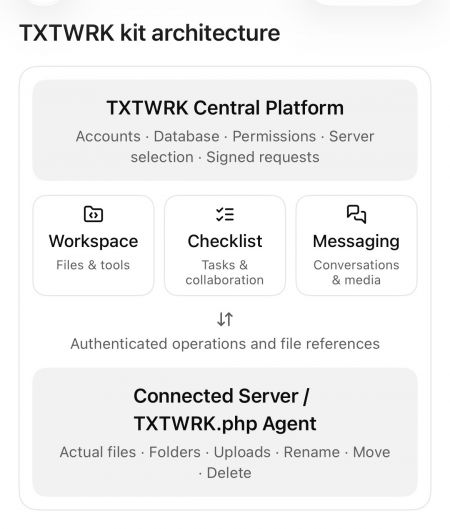
Consolidated Architecture


The Connected Server model now supports multiple application features.

The general request flow is:

TXTWRK Interface
↓
TXTWRK Central API
↓
Session and Permission Validation
↓
Connected Server Selection
↓
Signed API Request
↓
Customer's /TXTWRK.php Agent
↓
Filesystem Operation
↓
Operation Result
↓
TXTWRK Central

The central API uses signed requests incorporating a timestamp, nonce and HMAC-SHA256 authentication.

Development Achievement


The Server API provides a common infrastructure for:
•Workspace operations
•Checklist directories
•Messaging media storage
•Authorised file access
•Remote uploads and downloads

Assessment


Status: Core architecture implemented.

Complete security and production-readiness verification still requires end-to-end testing.

---

4. ORIGINAL MESSAGING API KIT


Original Purpose


The Messaging API Kit was designed to provide private communication while allowing users to store media through Connected Servers.

The original concept included:
•Personal conversations
•Group conversations
•Private file sharing
•Server-backed media uploads
•Multimedia previews
•Downloadable attachments
•User-controlled storage capacity

Consolidated Messaging Architecture


Messaging now participates in the common Connected Server model.

The reviewed central gateway supports:
•Personal Messaging identity
•Delegated @MessagingAccess identity
•Accepted Messaging Access grants
•Group upload authorisation
•Direct-message upload authorisation
•Server-backed media storage

Important Architectural Separation


Messaging identity and storage entitlement are not the same thing.

A user may be authorised to store files on a particular Connected Server without representing that server owner's Messaging identity.

This allows TXTWRK to distinguish:

Who is communicating?

from:

Which Connected Server may store the files?

Assessment


Status: Shared storage authorisation implemented.

The complete Messaging attachment lifecycle still requires verification, particularly Rename, Move, Delete and database-reference consistency.

---

5. WORKSPACE KIT


Purpose


Workspace is TXTWRK's general-purpose file-management and working environment.

It uses the Connected Server infrastructure to perform authenticated filesystem operations.

Implemented Functionality

•Directory browsing
•File and folder listing
•File creation
•Folder creation
•Uploads
•Downloads
•Rename
•Move
•Delete
•File editing
•File versions
•Edit locks
•File ownership checks
•Edit requests
•ZIP compression
•ZIP extraction
•Delegated File Access
•Checklist integration

Original Compatibility


The early Workspace implementation preserved the existing manage.php action contract.

This allowed the original browser interface to continue functioning while filesystem operations were routed through the Connected Server agent.

Checklist Integration


Workspace became aware of Checklist file relationships.

When supported Checklist files or directories are moved, the Workspace implementation can invoke central reference synchronisation.

This is important because files are no longer treated solely as independent filesystem objects.

They may also be attachments belonging to Checklist comments, replies or Threadlets.

Assessment


Status: Implemented with substantial integration.

Remaining work concerns consistency after deletion, partial failures and cross-feature reference updates.

---

6. CHECKLIST KIT


Purpose


Checklist provides task-oriented collaboration connected to files, participants and discussions.

Core Functionality

•Checklist creation and organisation
•Checklist items
•Grouped items
•Item navigation
•Checklist overlays
•Applications
•Apply Now
•Active participants
•Comments
•Replies
•Threadlets
•Connected files
•Member directories
•File viewers
•Activity information

Connected Server Integration


Each Checklist can be associated with a selected Connected Server.

The directory system operates within the Checklist's authorised context.

The later gateway implementation checks the relationship between:
•Checklist ID
•Server ID
•Checklist owner
•Active participant
•Requested member directory

This helps prevent Checklist directory access from becoming unrestricted Workspace access.

Comments and Replies


The discussion system supports attached files and richer content.

The reviewed work includes:
•Comment attachments
•Reply attachments
•File listings
•Image previews
•Video previews
•Thumbnail handling
•Formatting controls
•Comment sorting
•Reply interactions
•Web Impression content

Threadlets


Threadlets extend Checklist conversations with nested discussion.

Development work included:
•Nested Threadlet presentation
•New Threadlet controls
•Connected file lists
•Image and video attachments
•Primary media previews
•Thumbnail handling
•Pagination
•Mobile indentation
•Visual discussion boundaries

Threadlet attachments use an independent database structure, including threadlet_media_files.

Mobile Development


Recent work addressed:
•Safari overlay scrolling
•Background-page scroll interference
•Checklist scroll-container targeting
•Apply Now navigation
•Dynamic comment viewers
•Web Impression display
•Threadlet presentation

The revised Apply Now behaviour was reported working after testing.

Assessment


Status: Broad functionality implemented and actively refined.

Some attachment lifecycle and interface interactions still require comprehensive regression testing.

---

7. API CONSOLIDATION ARCHITECTURE


The consolidated architecture can be represented as:

TXTWRK CENTRAL
│
├── Server Management
│ ├── Server registration
│ ├── Verification
│ ├── Stored credentials
│ └── Signed communication
│
├── Workspace Kit
│ ├── File management
│ ├── File editing
│ ├── File permissions
│ └── Checklist integration
│
├── Checklist Kit
│ ├── Items and groups
│ ├── Applications
│ ├── Comments and replies
│ ├── Threadlets
│ ├── Connected files
│ └── Member directories
│
├── Messaging Kit
│ ├── Personal identity
│ ├── Delegated identity
│ ├── Group/direct messaging
│ └── Server-backed media
│
├── Shared Authorisation
│ ├── Server ownership
│ ├── File Access
│ ├── Checklist membership
│ └── Messaging Access
│
└── Shared File Reference Management
├── Comment references
├── Reply references
└── Threadlet references
│
▼
CONNECTED SERVER
│
└── /TXTWRK.php
├── Files
├── Folders
├── Uploads
├── Downloads
├── Rename
├── Move
└── Delete

This represents the logical architecture visible in the reviewed code. It does not imply that every component has been consolidated into one physical PHP file.

---

8. FILE REFERENCE SYNCHRONISATION


One of the most important later developments was central attachment-reference synchronisation.

Purpose


When a file or directory changes location, TXTWRK must preserve the relationship between that file and the content referencing it.

Current Implementation


The reviewed function is:

txtwrkSyncConfirmedMoves()

It is designed to run after the Connected Server confirms a Rename or Move operation.

Database Tables


Checklist Comments


Table:

post_c_comment

Fields:
•file_connected_array
•thumbnail

Checklist Replies


Table:

checklist_reply_uploads

Field:
•file_location_name

Threadlets


Table:

threadlet_media_files

Fields:
•relative_path
•original_name

Server Isolation


Reference updates are scoped to the selected Connected Server.

This prevents an operation on one server from indiscriminately updating matching paths belonging to another server.

Example


Original attachment:

/opensource/system/checklists/user_i/files/photo.jpg

Renamed attachment:

/opensource/system/checklists/user_i/files/new-photo.jpg

After a confirmed Rename operation, the synchronisation function can update the relevant stored references.

Current Limitations


The reviewed implementation does not fully establish:
•Reference cleanup after Delete
•Synchronisation of Threadlet thumbnail_path
•Complete Messaging attachment synchronisation
•Automatic recovery from partial failures

Assessment


Status: Rename/Move synchronisation implemented for reviewed Checklist attachment structures.

Deletion and broader lifecycle consistency remain unfinished or unverified.

---

9. ORIGINAL CODE VERSUS CURRENT DEVELOPMENT


CapabilityOriginal FoundationDeveloped System
Directory APIGeneral filesystem operationsIntegrated Workspace and Checklist file management
Server APIConnect and verify serversShared Connected Server infrastructure
Messaging APIPrivate communication and mediaIntegrated storage authorisation
WorkspaceExisting file-management actionsConnected Server routing and Checklist integration
ChecklistItems, comments and repliesDirectories, richer media and Threadlets
AuthenticationSigned server requestsAdditional feature-specific permission checks
AttachmentsFeature-specific stored pathsCentral Rename/Move synchronisation
MediaExisting uploads and previewsExpanded thumbnail and video handling
Mobile UIExisting responsive controlsTargeted overlay and scrolling corrections
The original system already contained substantial functionality.

Later work should therefore be described primarily as consolidation, integration, extension and refinement rather than the creation of every capability from nothing.

---

10. SECURITY AND ACCESS CONTROL


The reviewed architecture includes several protection layers.

Connected Server Security

•Server verification
•Server ID checks
•Stored server secrets
•Signed requests
•Timestamp and nonce handling

Workspace Security

•Server ownership checks
•File Access permissions
•Allowed folders
•Allowed files
•Path validation

Checklist Security

•Checklist ID validation
•Server association
•Owner/participant checks
•Member directory restrictions

Messaging Security

•Messaging Access grants
•Delegated identity handling
•Group upload authorisation
•Direct-message upload authorisation
•Separation of identity and storage entitlement

Remaining Security Work

•End-to-end authorisation testing
•Cross-server isolation tests
•Path traversal testing
•Partial-operation recovery
•Destructive-operation permission checks
•Consistent error handling

Assessment


Status: Multiple security layers implemented.

A complete production security audit has not been established from the available files.

---

11. DEVELOPMENT PROGRESSION


Phase 1 — Original API Foundation


Established:
•Directory API
•Server API
•Messaging API
•Connected Server verification
•Remote filesystem communication

Phase 2 — Backend Consolidation


Developed:
•Shared Connected Server communication
•Signed operations
•Central server selection
•Permission routing
•Workspace compatibility

Phase 3 — Workspace Integration


Expanded:
•Remote file management
•File editing
•File locks
•Versions
•Archive operations
•Delegated File Access

Phase 4 — Checklist Integration


Developed:
•Checklist-selected Connected Servers
•Participant directories
•Connected file management
•Comment and reply attachments
•Directory viewers

Phase 5 — Collaboration Expansion


Refined:
•Threadlets
•Connected media
•Video thumbnails
•Web Impressions
•Nested discussion presentation

Phase 6 — Reference Synchronisation


Implemented:
•Comment attachment path updates
•Reply attachment path updates
•Threadlet attachment path updates
•Server-scoped Rename/Move synchronisation

Phase 7 — Interface Refinement


Addressed:
•Mobile Safari scrolling
•Overlay behaviour
•Apply Now navigation
•Dynamic viewers
•Threadlet layout
•Pagination interactions

Phase 8 — Current Consolidation Completion


Outstanding priorities:
•Safe deletion handling
•Thumbnail-path synchronisation
•Messaging reference verification
•Consistent operation results
•Cross-kit regression testing
•Security and failure-recovery testing

---

12. CURRENT DEVELOPMENT STATUS


SystemAssessment
Connected Server infrastructureImplemented
Server verificationImplemented
Signed API requestsImplemented
Directory API integrationImplemented
Workspace file operationsImplemented
Checklist directoriesImplemented
Checklist comments/repliesImplemented
ThreadletsImplemented
Media and thumbnailsImplemented with remaining path-consistency work
Messaging storage authorisationImplemented in gateway
Checklist Rename/Move reference syncImplemented
Delete reference protectionIncomplete or unverified
Threadlet thumbnail-path syncIncomplete
Complete Messaging attachment lifecycleNot fully verified
Cross-kit integration testingNot established
Production security auditNot established
These assessments refer to reviewed source code and reported testing, not measured percentages of completion.

---

13. REMAINING DEVELOPMENT PRIORITIES


Priority 1 — Attachment Deletion


Establish a consistent policy for deleting files still attached to comments, replies or Threadlets.

Recommended approach:

Block deletion while active references exist, unless an explicit attachment-removal workflow is used.

Priority 2 — Threadlet Thumbnails


Synchronise or invalidate thumbnail_path when the corresponding media is renamed or moved.

Priority 3 — Messaging Integration


Verify Messaging file-reference behaviour against the same lifecycle standards used for Checklist attachments.

Priority 4 — Shared API Responses


Standardise operation responses across controllers and the Connected Server.

Avoid forcing success = true when the remote operation has failed.

Priority 5 — Cross-Kit Testing


Test complete workflows involving multiple kits.

Example:

1. Upload a file through Checklist.
2. Attach it to a comment.
3. Open it through Workspace.
4. Rename it.
5. Confirm the comment still opens it.
6. Move its parent directory.
7. Confirm the reference updates.
8. Attempt deletion.
9. Verify the selected deletion policy is enforced.

Priority 6 — Stability


Preserve existing user interfaces and controls while strengthening the shared backend.

Avoid creating additional parallel APIs for operations already supported by the consolidated infrastructure.

---

14. FINAL ASSESSMENT


The original TXTWRK architecture began with:

DIRECTORY API KIT

The developed architecture now consists of:

TXTWRK CENTRAL

The central architectural achievement is that file storage, user identity, authorisation and collaboration records can remain separate while operating through common infrastructure.

Workspace manages files.

Checklist organises work and associates files with collaborative discussions.

Messaging provides private communication and authorised media storage.

The Server API establishes trusted communication with Connected Servers.

The Directory API supplies reusable filesystem operations.

The consolidation layer connects these responsibilities.

Overall Conclusion


TXTWRK has progressed substantially beyond its original three-kit foundation.

It now represents an integrated platform for connected storage, file management, collaborative Checklist work and Messaging.

The next development milestone is not another independent API Kit.

It is completing the consistency of the existing consolidated architecture across every file operation, permission boundary and attachment relationship.

The foundation is implemented. The remaining challenge is complete cross-kit reliability and verification.

---

REPORT SCOPE


This report is based on:
•Original API source files shared in the conversation
•Subsequent Workspace and Checklist implementations
•Connected Server gateway and runtime code
•Messaging-related gateway code
•Reference synchronisation functions
•Threadlet and media-related development
•Interface changes and reported testing

It does not constitute a live production audit, a complete line-by-line diff of every revision or confirmation that every generated replacement file has been deployed.

1/6
🗖 VIEW
⛶
Technology
Neutral
TXTWRK Checklists All Activity installed today, next to Search


TXTWRK has extended All Activity into Checklist technologies, adding another specialised surface to an activity system that already operates across the Homepage, Profiles, Maps and the API Kit. The importance of the checklist implementation is that activity is not being developed as an isolated audit log for another product feature. Instead, the existing TXTWRK activity architecture is adapted to structured work: users can move from discovering activity across the platform to understanding activity surrounding a particular checklist, and now an individual checklist item. This gives Checklist technologies both an operational purpose—managing work—and a historical purpose—understanding how that work actually progressed.

Core capabilities introduced

•Checklist-level All Activity: activity can be viewed directly inside the checklist experience while remaining restricted to the relevant enclosing post.
•Checklist-item filtering: users can select a particular checklist item and retrieve activity associated specifically with that item.
•Existing All Activity controls remain available: username, search, time, ordering, activity categories and applicable scope controls continue to provide additional ways of exploring the history.

All Activity surfaceContext providedWhat a user can learn
HomepagePlatform-wide discoveryWhat is happening across TXTWRK
ProfileIndividual contextActivity surrounding a particular person
MapsGeographic contextWhat is happening in a location
API KitProgrammatic contextHow activity can be consumed by integrations
ChecklistStructured-work contextHow a checklist/post has progressed
Checklist ItemIndividual work-item contextHow a specific part of that checklist progressed
The Checklist Item filter is the key adaptation in this implementation. Checklist items are presented through a selector organised according to their existing checklist groups, making the activity interface reflect the structure of the work itself. Selecting an item changes the question being asked of All Activity from “what happened in this checklist?” to “what happened around this particular piece of work?” The selected item is combined with the enclosing post context, providing a progressively narrower history rather than relying on a simple keyword match. That gives TXTWRK a hierarchy of discovery running from platform activity through to highly specific work-item activity.

What the item-level adaptation enables

•Progress investigation: review the history surrounding one individual item instead of manually searching through the entire checklist timeline.
•Process learning: completed checklists can become historical records showing how particular stages of work developed, rather than becoming static completed task lists.
•Contextual investigation: item selection can work alongside other activity controls, allowing the history to be examined by participant, period, search term or other supported activity dimensions.

LevelExample questionActivity scope
PlatformWhat is happening across TXTWRK?All Activity
PersonWhat has happened around this user?Profile
LocationWhat has happened here?Maps
ChecklistHow did this body of work progress?Post/checklist
Checklist itemHow did this exact part of the work progress?Post + selected item
This creates a broader knowledge and learning capability around checklists. A normal checklist is principally concerned with the present state of work: what exists, what is outstanding and what has been completed. All Activity adds the temporal layer. Users can look backwards through activity and understand the path that led to the current state. Item-level filtering makes that history substantially more useful on large or complex checklists because the user does not need to reconstruct an individual item's story from an entire project history. As TXTWRK accumulates activity, previous checklists can consequently provide useful evidence of how work was approached, where interaction occurred and how individual elements progressed.

Wider product benefits

•One activity concept across multiple technologies: users encounter All Activity across Homepage, Profiles, Maps, API Kit and now Checklist technologies instead of learning unrelated history systems.
•Granularity without fragmentation: the user can move from broad discovery to post/checklist history and then individual-item history while remaining within the same conceptual activity system.
•Reusable historical knowledge: checklist activity can provide more than an audit trail; it can help users revisit previous work and understand the progression behind completed outcomes.

The comparison with established work-management technology helps clarify where this approach differs. monday.com provides board activity and an Item Activity Log. Jira records activity against individual work items, including areas such as comments, history and work logs. ClickUp provides individual task activity alongside broader Activity views. These products demonstrate the value of detailed work history. The distinguishing aspect of TXTWRK's implementation is not simply that checklist items have history, but that checklist-item activity becomes another specialised view of an activity concept already spanning people, geographic discovery, platform discovery and API consumption.

CapabilityTXTWRKmonday.comJiraClickUp
Broad activity experienceHomepage All ActivityBoard Activity LogPrimarily work-item/project activityActivity View
Individual work-item historyChecklist Item All ActivityItem/Subitem ActivityWork-item ActivityTask Activity
Person-oriented activity contextProfilesPerson filteringUser/change information within work itemsPerson/activity filtering
Geographic activity contextMapsNot a central Activity Log contextNot a central work-item Activity contextNot a central Activity View context
Programmatic activity contextAPI KitAPIs availableAPIs availableAPIs available
Structured checklist contextYesItems/subitemsWork items/subtasksTasks/checklists
Specific checklist-item filteringYesItem-level activityWork-item levelTask/checklist activity
Broad-to-specific activity modelPlatform → Profile/Map → Checklist → Checklist ItemBoard → Item/SubitemProject → Work itemLocation → Task
TXTWRK distinctionOne All Activity concept adapted across multiple platform technologiesStrong board/item historyStrong issue/work historyStrong task/workspace activity
There is also an important architectural distinction as Checklist technologies develop further. TXTWRK starts from the concept that All Activity can operate across several platform surfaces, with each technology adapting activity according to its own context. Checklist activity therefore does not have to end with recording that a task changed. It can participate in the wider discovery model used by Homepage activity, a person's Profile activity, geographically relevant activity through Maps and programmatic use through the API Kit. Adding the Checklist Item filter makes this adaptation considerably more specific: users can retain the wider All Activity capabilities while drilling down to one defined component of a checklist. The result is a checklist technology that can organise work, expose how that work progressed, and allow people to return later and learn from the history of individual items as well as the checklist as a whole.

1/6
🗖 VIEW

⛶
🍂 Autumn 2026 🍁

2026-09-23 01:05:00
2026-09-18 20:50:00
Location: Globally

Attend
Community
Neutral
Yes. I’d keep the broad Autumn 2026 / 100 events concept, but make the opening more action-led, turn the calendar into one clean Event | Date table, and expand the science into daylight, energy/routine and adaptability.

Here is the revised copy for the TXTWRK page:

🍂 AUTUMN 2026 — 100 EVENTS, IDEAS & THINGS TO DO 🍂

•Get your event ready
•Craft your Halloween Now
•Prepare for Winter & New Year
•Comment your outfit ideas! 🎃
•Countdown until the festivities! ⏳
•Make the next Global Calendar event 🌍

Autumn is here — so what are you doing with it?

From changing leaves, harvests and darker evenings to Halloween, festivals, science, community projects and preparations for winter, Autumn 2026 gives us plenty of reasons to get together, learn something, create something and enjoy the world around us.

In the Northern Hemisphere, the September equinox occurs at 00:05 UTC on 23 September 2026. The Sun crosses the celestial equator and day and night are approximately — although not exactly — equal in length. South of the equator, the same astronomical event marks the beginning of spring. (Time and Date1)

So wherever you are in the world: what's happening where you are?

🍁 WHAT CAN PEOPLE DO THIS AUTUMN?


• Go for an autumn walk, hike or cycle and photograph the changing landscape.
• Create a harvest, food, craft, music or community event.
• Organise a litter pick or neighbourhood volunteering day.
• Visit museums, libraries, heritage sites, farms, woodlands and observatories.
• Learn some astronomy and watch how sunrise, sunset and daylight change.
• Cook seasonal food and exchange recipes.
• Make Halloween costumes, decorations, lanterns and artwork.
• Hold a film, games, storytelling or stargazing evening.
• Learn about your local wildlife and habitats.
• Check in on neighbours, relatives and people who might appreciate some company or assistance.
• Prepare your clothing, home and routines for colder weather.
• Start planning Christmas, New Year and 2027.
• Create a TXTWRK Event and get other people involved.

📅 100 AUTUMN 2026 EVENTS & MOMENTS


Dates and traditions differ between countries, cultures and communities. Some religious observances also begin at sunset, so local calendars should always be checked when organising an event.

EVENTDATE
1. Meteorological Autumn begins — Northern Hemisphere1 Sep
2. International Day of Charity5 Sep
3. Indigenous Women & Girls Day5 Sep
4. International Day of Clean Air for blue skies7 Sep
5. International Day of Police Cooperation7 Sep
6. International Literacy Day8 Sep
7. Protect Education from Attack Day9 Sep
8. Rosh Hashanah period11–13 Sep
9. South-South Cooperation Day12 Sep
10. International Day of Democracy15 Sep
11. World Ozone Day16 Sep
12. Science, Technology & Innovation for the South Day16 Sep
13. World Patient Safety Day17 Sep
14. International Equal Pay Day18 Sep
15. World Cleanup Day20 Sep
16. Yom Kippur period20–21 Sep
17. International Day of Peace21 Sep
18. September Equinox 🍂23 Sep
19. International Day of Sign Languages23 Sep
20. World Maritime Day24 Sep
21. Mid-Autumn Festival 🌕25 Sep
22. Sukkot period25 Sep–2 Oct
23. International Day for the Total Elimination of Nuclear Weapons26 Sep
24. Harvest Moon weekend 🌕26 Sep
25. World Tourism Day27 Sep
26. Universal Access to Information Day28 Sep
27. Food Loss & Waste Awareness Day29 Sep
28. International Translation Day30 Sep
29. Harvest activitiesSeptember
30. Autumn photography walksSeptember
31. Community gardeningSeptember
32. Apple & orchard activitiesSeptember
33. Local-history walksSeptember
34. Stargazing nights 🔭September
35. Harvest food sharingSeptember
36. Back-to-learning projectsSeptember
37. Wildlife spottingSeptember
38. Autumn cyclingSeptember
39. Community volunteeringSeptember
40. International Day of Older Persons1 Oct
41. International Day of Non-Violence2 Oct
42. Shemini Atzeret / Simchat Torah period2–4 Oct
43. World Teachers' Day5 Oct
44. International Geodiversity Day6 Oct
45. Autumn nature trailsOctober
46. Pumpkin picking 🎃October
47. Halloween craftingOctober
48. Costume makingOctober
49. Autumn food & recipe swapsOctober
50. Community spooky-story nightsOctober
51. International Day of Rural Women15 Oct
52. World Food Day16 Oct
53. International Day for the Eradication of Poverty17 Oct
54. Dussehra / Vijayadashami20 Oct
55. International Day of the Snow Leopard23 Oct
56. United Nations Day24 Oct
57. World Development Information Day24 Oct
58. Disarmament Week24–30 Oct
59. Media & Information Literacy Week24–31 Oct
60. World Day for Audiovisual Heritage27 Oct
61. International Day of Care and Support29 Oct
62. World Cities Day31 Oct
63. Halloween 🎃31 Oct
64. Costume & fancy-dress night31 Oct
65. Pumpkin-carving night31 Oct
66. Community Halloween events31 Oct
67. Halloween film night31 Oct
68. Trick-or-treat activities31 Oct
69. All Saints' Day1 Nov
70. All Souls' Day2 Nov
71. Día de los Muertos period1–2 Nov
72. End Impunity for Crimes against Journalists Day2 Nov
73. World Tsunami Awareness Day5 Nov
74. Guy Fawkes / Bonfire Night 🇬🇧5 Nov
75. Environment in War & Armed Conflict Day6 Nov
76. Dhanteras6 Nov
77. Diwali / Deepavali 🪔8 Nov
78. International Week of Science & Peace9–15 Nov
79. World Science Day for Peace & Development10 Nov
80. Govardhan Puja period10 Nov
81. Armistice Day11 Nov
82. Bhai Dooj11 Nov
83. Remembrance activities11 Nov
84. World Diabetes Day14 Nov
85. Organized Crime Prevention Day15 Nov
86. International Day for Tolerance16 Nov
87. International Day of the Mediterranean Diet16 Nov
88. Road Traffic Victims Remembrance17 Nov
89. Antimicrobial Resistance Awareness Week18–24 Nov
90. World Toilet Day19 Nov
91. Africa Industrialization Day20 Nov
92. World Children's Day20 Nov
93. World Television Day21 Nov
94. Guru Nanak Gurpurab24 Nov
95. Elimination of Violence against Women Day25 Nov
96. World Sustainable Transport Day26 Nov
97. Thanksgiving Day — USA26 Nov
98. Day against Child, Early & Forced Marriage27 Nov
99. International Day of Solidarity with the Palestinian People29 Nov
100. Chemical Warfare Victims Remembrance Day30 Nov
# 🔬 THE SCIENCE OF AUTUMN — LIGHT, TIME & US

Autumn isn't simply about temperature. It's also a major change in light.

Earth's axis is tilted relative to its orbit. After the September equinox, places in the Northern Hemisphere progressively experience shorter daylight hours and longer nights until the December solstice. How dramatic that change is depends strongly on latitude. (Time and Date1)

☀️ Daytime hours change


Around the equinox, everywhere receives roughly comparable amounts of daylight and darkness, although atmospheric refraction and the way sunrise and sunset are defined mean it isn't literally 12 hours each. From there, northern locations lose daylight while southern locations gain it. (Time and Date1)

That means your familiar 6pm walk can gradually become a walk in darkness. Outdoor sports, commuting, photography, gardening and community events may all need different timings.

Notice the daylight — and adapt your day with it.

🧠 What about human energy?


Humans have an internal circadian system involved in regulating sleep and wakefulness, alertness, hormone rhythms and other daily biological processes. Light is an important environmental signal for that system.

Research has found seasonal differences in sleep and circadian timing, although they aren't identical for everybody. A study of more than 500 university students found sleep timing was later in autumn and winter and that daytime light exposure was an important predictor of circadian timing. (PubMed2)

More recent international wearable research also suggests that day length matters more than simply attaching the label "winter" or "summer" to people's sleep. Across participants in 49 countries, longer daylight was associated with slightly shorter sleep duration, while broad seasonal categories explained relatively little once individual and country differences were considered. (PubMed3)

So don't assume everyone automatically becomes tired because it is autumn. People, routines, locations, light exposure and individual body clocks differ.

⚡ ADAPT YOUR ENERGY — DON'T FIGHT THE CLOCK


Autumn can be a useful time to become more aware of your own patterns.

• Get useful daylight exposure during the day, particularly if you're spending much of autumn indoors.
• Keep sleep and waking routines reasonably consistent where possible.
• Notice when you're naturally most alert and schedule demanding work appropriately when you have that flexibility.
• Move outdoor activities earlier as sunset moves earlier.
• Prepare lighting and visibility equipment before you actually need it.
• Keep physically active instead of allowing darker evenings automatically to become inactive evenings.
• Build indoor alternatives for activities that weather might interrupt.
• Give yourself time to adjust when clocks change.
• Learn to plan around changing weather rather than cancelling everything because conditions aren't perfect.
• Keep developing practical seasonal skills.

Research supports the importance of daylight exposure to circadian timing; natural-light studies have also demonstrated that the human biological clock responds to seasonal light-dark cycles. (PubMed4)

🛠️ AUTUMN IS ALSO ABOUT ADAPTIVE SKILLS


Humans have always had to adapt to seasons. Modern life changes how we do that, but the principle remains useful.

Learn something this autumn.

Cook something you've never made. Learn basic clothing repair. Read a map. Improve your photography. Learn first aid. Grow something. Identify local trees. Understand the weather forecast. Learn basic astronomy. Improve your cycling skills. Volunteer. Try a new sport. Learn how your home uses energy. Organise an event. Meet somebody new.

And learn to change plans intelligently.

Rain? Take waterproofs or move the activity indoors.

Dark earlier? Change the time and improve visibility.

Cold? Layer clothing appropriately.

A cancelled outdoor event? Have a backup.

A quiet evening? Use it to learn, make, repair, plan or connect.

Adaptability is a skill — and every changing season gives us an opportunity to practise it.

🧥 KEEP WELL, WARM & SAFE


Autumn weather can change quickly, and daylight disappears progressively earlier across much of the Northern Hemisphere.

• Check the forecast before outdoor events and journeys.
• Wear suitable layers and waterproof clothing.
• Carry lights or use reflective clothing when walking and cycling after dark.
• Watch for wet leaves, slippery surfaces, ice, fog and poor visibility.
• Take particular care with candles and Halloween decorations.
• Follow local rules and safety advice for fireworks and bonfires.
• Never leave open flames unattended.
• Check heating and cooking equipment before winter.
• Make sure pets are secure around fireworks.
• Look out for neighbours, friends and relatives during colder weather.
• Keep emergency contacts and basic supplies accessible.
• Don't wait for severe winter weather before preparing for it.

Keeping warm, prepared and visible is better than being caught out.

🎃 HALLOWEEN IS COMING...


Costume planned?

Pumpkin ready?

Decorations made?

Film selected?

Event created?

Start your countdown. ⏳

Show TXTWRK what you're making, tell everyone what you're dressing as and create something people can join.

Then Halloween isn't the end...

🔥 Bonfire Night
🪔 Diwali
🕯️ Remembrance
❄️ Winter
🎄 Christmas
🎆 New Year 2027

There is always something coming next.

🌍 MAKE THE NEXT GLOBAL CALENDAR EVENT


See something missing from the list?

Make it.

TXTWRK users can add an Event when creating a post on TXTWRK and include it in the World Calendar.

That could be an established global occasion, a community activity or something you're creating yourself.

Your event could start locally and become something people discover elsewhere.

Add the event.
Give it a date.
Tell people what it's about.
Invite participation.
Put it on the World Calendar. 🌍

🍂 WHAT WILL YOU DO THIS AUTUMN?


Walk somewhere new. Learn something. Make something. Help somebody. Photograph the season. Explore your community. Celebrate responsibly. Look after yourself. Prepare for winter.

And don't just wait for the next event.

Create the next event.

🍂 AUTUMN 2026

🎃 HALLOWEEN 2026

🌍 GLOBAL CALENDAR
❄️ PREPARE FOR WINTER
🎄 CHRISTMAS IS COMING
🎆 THEN — 2027

Comment your outfit ideas!
Tell us what's happening where you are.
Add your event to the TXTWRK World Calendar.

TXTWRK — What will you do next?

1: https://www.timeanddate.com/calendar/september-equinox.html?utm_source=chatgpt.com "September Equinox: When and What Is It?"
2: https://pubmed.ncbi.nlm.nih.gov/36404490/?utm_source=chatgpt.com "Daytime light exposure is a strong predictor of seasonal variation in sleep and circadian timing of university students."
3: https://pubmed.ncbi.nlm.nih.gov/42332253/?utm_source=chatgpt.com "Variation in sleep duration across latitudes and countries: a Bayesian hierarchical analysis of wearable data - PubMed"
4: https://pubmed.ncbi.nlm.nih.gov/28162893/?utm_source=chatgpt.com "Circadian Entrainment to the Natural Light-Dark Cycle across Seasons and the Weekend."

🗖 VIEW
⛶
Neutral
NEW — TXTWRK Audio Rooms Are Here


Today, TXTWRK is rolling out Audio Rooms — our approach to community audio that challenges a basic convention of live-audio technology:

Why should everybody have to be live just because the room is?

We have wanted to bring live audio into TXTWRK for some time, but recreating the familiar live-stage or voice-channel model wasn't enough. We wanted audio to fit the way communities actually participate: around work, different schedules, different levels of availability and different amounts of time people have to contribute.

An Audio Room therefore belongs to the post itself. A host can take the room Live, participants can request access, listen to contributions and add their own recordings, while the conversation can continue without demanding that everybody remains simultaneously present.

> The room can be Live. You don't have to be.

---

Live audio has largely been built around presence


The biggest social and community networks have approached audio from different directions.

X has used live social-audio spaces. Discord has made persistent voice channels a fundamental community tool. TikTok combines live creator experiences with an enormous audiovisual network. Meta's platforms have built communication around combinations of posts, messaging, calls, video and live experiences.

Those technologies are useful, but they generally leave a gap between asynchronous social content and synchronous group audio.

TXTWRK Audio Rooms are designed specifically for that gap.

How the approaches compare


Technology / NetworkWhere Audio Generally SitsParticipation ModelRelationship to Original ContentTime ExpectationTXTWRK's Difference
XLive social-audio spaces alongside the social networkPrimarily synchronous live participationA Space can relate to discussion on X, but the audio room is its own live experienceStrong value in being present while the Space is happeningThe Audio Room is directly attached to the post and can accumulate individual contributions while remaining Live
Meta / Facebook & InstagramLive video, calls, messaging, voice messages and creator/social experiencesMix of synchronous and asynchronous communicationAudio capabilities are distributed across different communication formatsDepends on the particular product or featureTXTWRK gives a post a dedicated community Audio Room rather than making users choose a separate communication format
TikTokCreator-led audiovisual content and LIVE experiencesPublished asynchronous media plus synchronous LIVE participationStrong relationship between creator, content and audience responseVideos can be consumed anytime; LIVE participation remains time-sensitiveTXTWRK makes the community itself able to progressively construct an audio conversation around a post
DiscordPersistent voice channels inside servers and communitiesPrimarily synchronous voice presenceVoice belongs to a server/channel rather than an individual public postParticipants generally enter the channel together to converseTXTWRK attaches the room to the subject being discussed and allows recorded contributions to build over time
TXTWRKAudio Room directly attached to a postLive-like, asynchronous community contributionThe post remains the source and context of the roomListen, leave, work, return and contributeThe room can remain Live without requiring the community to remain continuously present
The point isn't that these networks are identical competitors. They aren't. Each has developed around different communities and behaviours.

The comparison instead shows the convention TXTWRK is challenging:

> Audio usually becomes somewhere you go. On TXTWRK, audio becomes something the existing post can do.

---

The technology behind that difference


An Audio Room combines several systems that would traditionally be separated between a social post, a live room, voice notes and community moderation.

TXTWRK TechnologyWhat It DoesWhy It Matters to Communities
Post-attached Audio RoomsAssociates the room with the post that created itKeeps the subject, written context and community audio together
Offline / Live statesThe room begins Offline and the host decides when to take it LiveHosts determine when participation opens
Join requestsCommunity members request permission to contributeParticipation can remain open without becoming uncontrolled
Host access controlsRequests can be accepted, access removed, users blocked and later unblockedGives the room owner practical moderation controls
Individual audio recordingsContributions are recorded separately rather than requiring one continuous broadcastPeople can participate at different moments
Guest recording limitsHosts can select 10s, 15s, 30s, 1m, 3m or unlimited contributionsThe structure of the room can encourage concise or detailed responses
Continuous listeningExisting recordings can be played through as the conversation developsSomeone arriving later can hear what the community has already contributed
New contribution updatesNew recordings can appear as the active room developsThe experience remains current without requiring one continuous audio stream
Data accountingRecordings consume the recording user's TXTWRK data allowanceMedia storage has an understandable relationship with its creator
Data return on deletionApplicable usage can be returned when recordings are removed; post deletion returns applicable recording data to contributorsCommunity members retain greater control over the storage created by their participation
Future Checklist integrationThe same Audio Room concept can accompany structured collaborative workVoice can become contextual community knowledge around actual tasks
This is why the interesting part of Audio Rooms isn't simply recording sound in a browser.

It is the architecture around the recording.

---

Communities don't operate on one clock


Consider a community conversation involving somebody commuting, somebody at work, somebody caring for family, somebody in another part of the world and somebody who simply wants time to think before responding.

A conventional live room creates a coordination problem before the conversation has even started.

TXTWRK changes the requirement. The community shares the room, but it doesn't have to share the moment.

A participant can:
•Discover a post and its Live Audio Room.
•Request access to contribute.
•Listen to what other people have already added.
•Continue with their day.
•Return to the room later.
•Record a contribution within the room's chosen limit.
•Hear subsequent contributions as the community develops the discussion.

That creates something between a voice note and a live stage:

A persistent, live-like community audio conversation.

---

Recording limits can improve the conversation


More recording time isn't automatically better communication.

Hosts can configure guest contributions according to what the conversation actually needs.

Recording AllowanceA Useful Example
10 secondsConfirmation, immediate observation or concise answer
15 secondsShort reaction or additional context
30 secondsFocused community contribution
1 minuteExplanation, suggestion or personal experience
3 minutesDetailed reasoning or substantial update
UnlimitedConversations where restricting contribution length would be counterproductive
The host isn't restricted by the guest limit.

This gives communities another tool that conventional live audio rarely provides:

The ability to design for concision before the microphone is opened.

---

Audio can add what text sometimes loses


Text remains fundamental to TXTWRK. Audio Rooms aren't an attempt to replace it.

Voice simply carries information differently.

Tone can provide reassurance. Hesitation can communicate uncertainty. Enthusiasm can communicate conviction. Somebody with direct experience can sometimes explain in thirty seconds what would otherwise become several paragraphs.

That is especially useful when the audio remains attached to the written material that gives it meaning.

The post establishes the subject. The Audio Room lets the community write back with its voice.

---

Participation also requires responsibility


Making it easier to speak shouldn't mean encouraging people to speak without consideration.

If somebody isn't sure what to say, there is no requirement to immediately record something. They can reassess the situation, listen again, return later, or make their next contribution calmer, more constructive or more reassuring.

Hosts have controls over who can contribute, and misuse of Audio Rooms may result in access to the capability being limited or restricted.

The objective is not maximum noise.

It is lower friction for worthwhile participation.

---

Data should remain understandable


Recorded media has a storage consequence, and TXTWRK doesn't want that consequence to become invisible simply because uploading media is easy.

Audio Room recordings therefore work with TXTWRK's data accounting. Recordings use the contributor's data balance. Deleting an individual recording can return the applicable usage to that contributor, while deleting the underlying post returns applicable recording data associated with the Audio Room to its contributors.

That creates a more direct relationship between:
•Creating data
•Storing data
•Managing data
•Removing data
•Reclaiming applicable data usage

For community technology designed to exist over long periods, that matters.

---

Next — Audio Rooms in Checklists


This is where the model can move beyond conversation and towards public community working.

Audio Rooms are planned for TXTWRK Checklists, bringing community voice into our open-source public working spaces.

Without Contextual Community AudioWith Audio Rooms in Checklists
Read that a task has a problemHear somebody explain the problem
Write a long contextual updateLeave a focused spoken explanation
Ask everyone to attend a callContributors can listen when available
Move discussion into a separate chatKeep discussion alongside the work
Lose useful explanations in message historyKeep contributions associated with their working context
Coordinate around everybody's availabilityAllow knowledge to arrive across different schedules
Imagine somebody working through a public checklist and encountering a problem.

They leave a short audio contribution explaining what they found. Hours later, another community member reaches the same work, hears that explanation, solves part of the problem and contributes their own experience.

There was no meeting to arrange.

Nobody needed to move the discussion into a private group chat.

Nobody needed to be online simultaneously.

The community knowledge stayed beside the community work.

---

A different direction for social technology


Today we're happy to challenge some very large technology conventions.

From X to Meta, TikTok to Discord, Big Tech has demonstrated just how powerful voice, communities, creators and live participation can become.

TXTWRK is asking what happens when those ideas are rearranged around a different priority:

The community's time.


Not another destination that requires everybody to arrive.

Not another hour-long session people have to keep open.

Not audio separated from the thing everybody was originally discussing.

Instead, a post can open a room. The room can become Live. The community can listen and contribute across its own time. The resulting voices remain connected to their context.

And soon, that same principle can move into Checklists and our open-source public working community spaces.

---

The Audio Room can be Live. You don't have to be.


Work through your day.

Listen when you can.

Contribute when you have something worth adding.

Come back and hear where the community has taken it.

NEW — TXTWRK Audio Rooms are here.

Profile Image
@ImSunnyClaire
Sunny Claire

Neutral
Welcome to TXTWRK Audio Rooms...

Developed in a post today within 2 hours...

To be expanded into Checklist Items & Messaging...

It currently uses your data balance for records, whereas if it's in a checklist item or messaging server, then your data balance is used, unless user has server set a server to them.

Audio Room
Online
An up to date profile & bio may improve your chances to be welcomed into an audio room

NOTES
14:02 15/09/2026
We're going to keep this live through today and turn it off tomorrow... This will be implemented into smart working spaces for all my ventures, starting with @DerbyCommunityHub